

Review automation software is useful when it turns post-purchase feedback into a repeatable process that increases review volume, improves timing, and protects brand reputation. It saves staff time, standardises requests, and helps businesses respond faster to public feedback.
Review automation matters because customers rarely leave reviews without a prompt. Automated workflows send requests at the right moment, often after a purchase, booking, or support interaction. That timing increases participation and reduces the gap between customer satisfaction and public evidence.
The best systems do more than send messages. They track outcomes, record response history, and route negative feedback into private resolution flows. That structure supports reputation management for business teams that want consistency across locations, staff members, and service channels.
For a broader service context, many teams pair software selection with a dedicated reputation management for business strategy. That link matters because software alone does not define reputation outcomes.
Which features matter most?
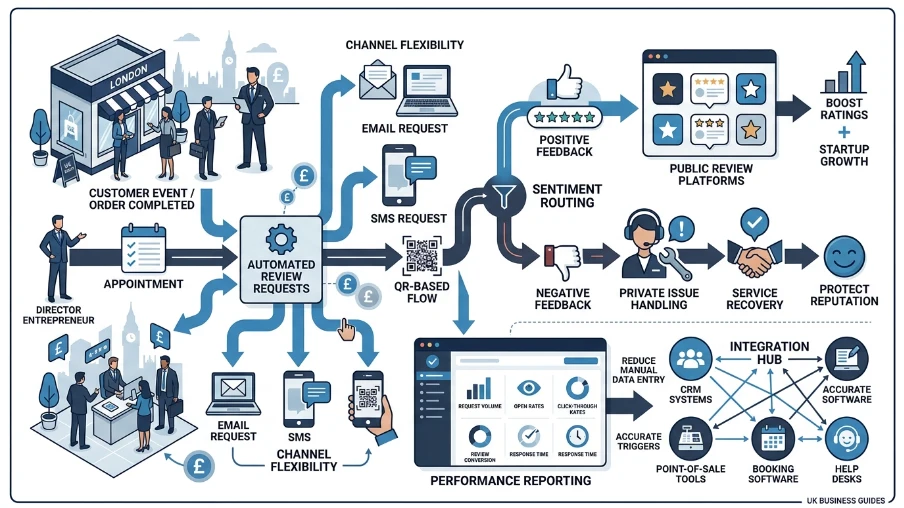
The most important features are automated review requests, channel flexibility, sentiment routing, reporting, and integrations. These functions determine whether the software creates measurable review growth or simply adds another messaging tool.
Automated review requests are the core feature. They trigger messages after defined events, such as completed orders or appointments. Strong platforms support email, SMS, and sometimes QR-based request flows, which gives businesses more reach across customer types.
Sentiment routing separates positive and negative responses. Positive feedback moves toward public review platforms. Negative feedback moves into private issue handling. That split protects ratings while giving teams a faster path to service recovery.
Reporting is equally important. Useful dashboards show request volume, open rates, click-through rates, review conversion, and response time. These metrics reveal whether the system increases engagement or creates friction.
Integrations also matter. A strong platform connects with CRM systems, point-of-sale tools, booking software, and help desks. Those connections reduce manual data entry and make review triggers more accurate.
How does timing affect results?
Timing drives review performance because customers respond best when the experience is fresh. The strongest systems trigger requests after verified service completion, then personalise the message to match the customer journey.
A review request sent too early feels disconnected. A request sent too late loses emotional relevance. Good software solves this by linking automation to real events, such as delivery confirmation, appointment completion, or ticket closure.
Personalisation also lifts response rates. The best platforms insert customer names, service details, and branch identifiers where relevant. That context increases trust and makes the request feel specific rather than generic.
Segmented timing helps teams avoid over-messaging. For example, first-time buyers may receive one request, while repeat customers enter a different sequence. That approach supports more precise review management for business operations with multiple customer groups.
For teams evaluating nurture flows, the article how automated review requests help small businesses grow explains why timing and sequence design affect volume and customer trust.
Why do integrations matter?
Integrations matter because they connect review automation to real business data. That connection improves trigger accuracy, reduces manual work, and keeps customer records aligned across sales, service, and support systems.
Without integrations, teams often upload contact lists manually. That process creates delays and data errors. It also weakens the link between service completion and request delivery.
With integrations, the software can detect events automatically. A restaurant POS can mark an order complete. A clinic booking system can mark an appointment finished. A service CRM can mark a case as closed. Each event becomes a trigger for a review request.
This matters for business services teams that manage multiple touchpoints. A connected system creates one workflow across locations, departments, and customer segments. That consistency supports stronger reputation management for business teams that want cleaner operations and fewer missed opportunities.
What reporting proves value?
Useful reporting shows how many requests were sent, how many were opened, how many produced reviews, and how customers responded. These metrics expose performance gaps and guide better campaign decisions.
Review automation software should track the full journey. Request sent. Message opened. Link clicked. Review posted. Negative feedback flagged. That sequence gives teams a clear view of conversion performance.
Some platforms also measure by channel. Email performance often differs from SMS performance. That comparison helps teams choose the channel that produces the highest review rate for their audience.
Reporting also supports benchmarking. If one branch converts at 18% and another converts at 7%, the gap often reflects timing, staffing, or customer mix. Reliable software makes those differences visible.
The strongest dashboards include exports and scheduled reports. That feature supports managers who review performance weekly or monthly. It also helps agencies and multi-site businesses compare trends across campaigns.
What about response management?
Response management matters because reviews influence trust after they are published. Good software centralises alerts, assigns ownership, and supports fast replies that protect brand credibility.
A public review rarely exists in isolation. Customers read the business response as part of the experience. Software that flags new reviews quickly gives teams time to respond while the issue still feels current.
Centralised inboxes help teams work faster. One system gathers reviews from multiple platforms and shows status, owner, and response history. That reduces missed comments and duplicate replies.
Template support also matters, but templates must stay flexible. A useful system lets teams adapt tone by issue type, location, or service line. That capability protects consistency without sounding robotic.
This function is central to reputation management for business because response speed affects public perception. A fast, factual reply often matters as much as the review itself.
How do compliance and controls help?
Compliance and controls protect customer trust by managing consent, permissions, data retention, and message frequency. The best software supports lawful communication and prevents over-contacting customers.
Review requests use personal data, so the platform must handle consent properly. Good systems store opt-in status and reduce the risk of sending messages to customers who did not agree to receive them.
Frequency controls also matter. If customers receive repeated prompts, the brand can look pushy. Strong software sets rules for cooldown periods and message caps.
Role-based access adds another layer of control. It lets managers, branch teams, and agencies see only the data they need. That structure reduces errors and supports clean audit trails.
For businesses in regulated or high-trust sectors, these controls carry extra weight. Review automation should support operational discipline, not create new privacy risks.
Which platform is the right fit?
The right platform matches business size, review volume, channel mix, and operational complexity. A small team needs simplicity, while a multi-location brand needs automation depth, reporting, and governance.
Small businesses benefit from fast setup and clear workflows. They often value SMS, email, and basic dashboards more than advanced customisation. Larger teams usually require segmentation, integrations, permission controls, and branch-level reporting.
Pricing also deserves attention. Some vendors charge by location. Others charge by message volume or feature tier. The cheapest option often lacks the reporting and routing features that drive long-term value.
Ease of use remains essential. If staff members struggle to configure triggers or read reports, adoption drops. A strong platform keeps the workflow understandable and reduces dependence on technical support.
For teams comparing commercial options, review management solutions for small businesses offers a decision-focused view of how software fits broader reputation goals.
Explore our reputation management for business guides,
Why Businesses Need Both Local SEO and Reputation Management
Reputation Challenges Every Medical Practice Should Address
How to evaluate vendors
The best vendor gives you automation depth, clear reporting, integration support, and dependable customer service. It also shows how the system fits real workflows before you commit.
Start with the trigger logic. Ask how the system detects completed transactions and how quickly requests go out. Then test channel options and see whether the vendor supports the communication methods your customers already use.
Next, review reporting depth. Good vendors show conversion data, channel performance, and response trends without requiring manual exports. They also explain how negative feedback routes into private handling.
Finally, test onboarding and support. A good vendor explains setup, migration, and training in direct terms. That clarity reduces launch delays and makes implementation more predictable.
Clear My Name helps businesses approach this decision through reputation management for business, with a focus on systems that improve visibility, response speed, and review consistency. The right choice supports operational control, not just more messages.
Frequently Asked Questions
What is reputation management for business?
Reputation management for business is the process of monitoring reviews, responding to feedback, and improving how a company appears online. Clear My Name uses this approach to help businesses manage customer trust, search visibility, and review performance.
Why is reputation management important for small businesses?
Reputation management matters because online reviews directly influence customer trust and purchase decisions. For small businesses, Clear My Name helps organise review monitoring and response workflows so feedback does not go unmanaged.
How does review monitoring support business reputation?
Review monitoring tracks new feedback across major platforms so teams can respond quickly. It supports reputation management for business by helping identify patterns, resolve issues faster, and maintain consistent public messaging.
What services are included in reputation management for business?
Typical services include review monitoring, review response management, sentiment tracking, and customer feedback workflows. Clear My Name focuses on these core reputation management functions to help businesses maintain a stronger online presence.
How do businesses improve their online reputation?
Businesses improve their online reputation by collecting more positive reviews, responding professionally to negative feedback, and fixing recurring service issues. Clear My Name supports reputation management for businesses by helping teams create a structured process for these actions.