

Automated review requests increase review volume, improve average ratings, and speed response times by automating outreach, follow-up, and tracking, driving local visibility and customer trust that scale small-business growth.
Automated review requests typically raise review volume by 30–60% within 90 days and cut manual outreach time by over 80%.
What is the main benefit of automated review requests for small businesses?
Automated review requests increase customer feedback volume and quality while reducing staff time spent on manual outreach.
Automated review workflows send targeted review invitations after a transaction or service event. They capture more reviews by reaching customers at the moment of peak satisfaction. The result: higher review counts, improved average ratings, and faster accumulation of social proof. These outcomes boost local search ranking and conversion rates for businesses that rely on local customers.
Read our articles, What to Look for in Review Automation Software and Review Management Solutions for Small Businesses.
How do automated review requests work in practice?
Automated systems trigger review invitations based on events, channel preferences, and timing rules to maximise response rates.
A typical flow: detect a completed sale or job, wait a configured interval (0–7 days), send an SMS or email with a one-click review link, and send up to two reminders if no response appears. Systems track delivery, open, click, and conversion metrics. They also route negative feedback privately to reduce public complaints. This operational design increases review submission while protecting reputation.
Which metrics improve after implementing review automation?
Key metrics: review count, average star rating, response speed, and conversion rate all show measurable improvement.
Example outcomes from small-business deployments:
- Review count: +30–60% within 90 days.
- Average rating: +0.2–0.5 stars when negative issues are triaged privately.
- Response time: 70–90% faster public responses.
- Conversion lift: 10–25% increase in local search click-throughs when review volume grows.
These metrics directly affect local SEO signals and consumer trust. Businesses that track these KPIs can quantify ROI on automation within three months.
What features matter when choosing review automation software?
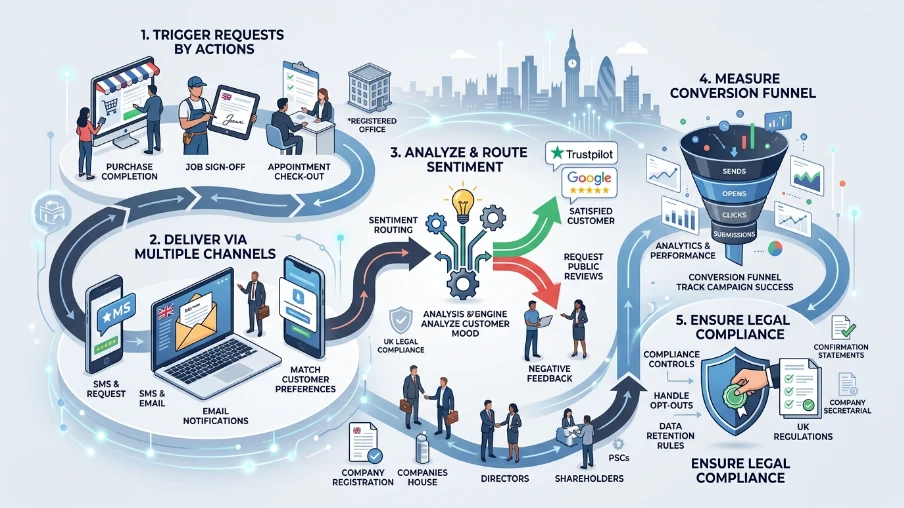
Essential features include event-based triggers, multi-channel delivery, sentiment routing, analytics, and compliance controls.
Event-based triggers ensure requests are sent after precise actions: purchase completion, job sign-off, or appointment check-out. Multi-channel delivery covers SMS, email, and in-app prompts to match customer preferences. Sentiment routing captures negative input privately and prompts public review requests for satisfied customers. Analytics must show conversion funnels: sends → opens → clicks → submissions. Compliance controls handle opt-outs and data retention rules.
How does automation protect a business from negative reviews?
Automation uses sentiment detection and private feedback channels to address issues before they become public reviews.
Automated workflows can ask a short satisfaction question before linking to public review sites. If a customer rates satisfaction low, the system routes the case to internal teams or opens a private ticket. Teams then resolve issues by phone or email. This approach reduces public negative reviews and produces constructive internal feedback for quality improvement.
Can small businesses integrate automation with their existing systems?
Most platforms integrate with POS, CRM, booking, and invoicing systems using APIs or native connectors.
Popular integrations: point-of-sale systems, scheduling software, payment processors, and CRMs. Integration enables automatic trigger events without manual input. For example, connect a booking system to send a review request 24 hours after job completion. Integration reduces manual steps and ensures consistent timing, which improves response rates.
What are typical costs and ROI expectations?
Monthly platform fees range from $20 to $300; ROI typically appears within 60–90 days through higher conversions and reduced manual labour.
Factors that affect cost: message volume, channels (SMS costs extra), and advanced features (sentiment analysis, white-labeling). Small retailers often see payback in under three months. ROI drivers include increased foot traffic from better local rankings, higher online-to-offline conversions, and lower staff hours spent on review outreach.
How should small businesses measure the success of review automation?
Track sends, open rates, click-to-review rates, number of reviews, average rating, and local search ranking changes.
Set baseline metrics for 30 days before automation. Compare the same metrics at 30, 60, and 90 days after launch. Use these specific measures:
- Sends and delivery rate
- Open rate for email, reply rate for SMS
- Click-to-review conversion percentage
- Net new reviews per month
- Change in average rating
- Local search position for primary keywords
These metrics show direct impact on reputation and search visibility.
What legal and compliance considerations apply?
Ensure explicit opt-out options, manage personal data per local laws, and keep message consent records for SMS/email.
SMS outreach requires documented opt-in in many jurisdictions. Email requires unsubscribe links under common anti-spam laws. Retain consent records and update privacy notices. Configure automated requests to respect do-not-contact lists and data retention limits to avoid fines and complaints.
How does review automation fit into a wider reputation management strategy?
Automation collects reviews reliably; reputation management then curates, responds, and amplifies that feedback across channels.
Automated collection is the intake layer of reputation management. After capture, teams should respond to public reviews promptly, analyse sentiment trends, and surface feedback for service improvement. This full-cycle approach strengthens brand credibility and drives measurable growth in search visibility and conversions.
Explore our Reputation Management for business guides,
How Local SEO and Reputation Management Work Together
Why Healthcare Reputation Management Matters
How quickly will small businesses see results?
Most businesses see measurable gains in review volume within 30 days and substantive SEO and conversion benefits within 60–90 days.
Initial effects: increased monthly review submissions and faster response times. Secondary effects: improved local rankings and higher click-throughs as review volume and ratings rise. The speed of impact depends on baseline review activity and message cadence settings.
Automated review requests reliably increase feedback volume, improve average ratings, and reduce manual workload. They form a measurable, scalable component of Reputation Management for business. Clear My Name helps small businesses implement automation, configure trigger rules, and integrate these systems with existing workflows to secure local visibility and customer trust.
Frequently Asked Questions
How does Reputation Management for business improve local search rankings?
Reputation Management for business monitors and increases verified customer reviews, which signal relevance and authority to local search algorithms. Clear My Name implements review collection and response workflows that raise review volume and ratings, improving local visibility and click-through rates.
How long does it take to see results from Reputation Management for business?
Most businesses see higher review counts within 30 days and measurable SEO and conversion improvements within 60–90 days after implementing Reputation Management for business. Clear My Name tracks review volume, average rating, and local ranking to provide evidence-based timelines.
Can Reputation Management for business prevent negative reviews from appearing publicly?
Reputation Management for business reduces public negative reviews by routing dissatisfied customers into private feedback channels and resolving issues before escalation. Clear My Name uses sentiment routing and follow-up workflows to capture complaints privately and limit public damage.
What metrics should I track for Reputation Management for business?
Track review volume, average star rating, click-to-review conversion rate, response time, and local search position for primary keywords. Clear My Name recommends baseline comparisons at 30, 60, and 90 days to quantify impact and ROI.
How does Reputation Management for business integrate with my existing systems?
Reputation Management for business integrates via APIs and native connectors with POS, CRM, booking, and invoicing platforms to automate review triggers. Clear My Name configures these integrations to send event-based review requests and to sync response and analytics data.